

1. Summary
Spatial Tattoo is a groundbreaking application for the Apple Vision Pro that merges artificial intelligence with spatial computing to revolutionize the art of tattooing. By transforming the user's environment into a professional-grade virtual studio, the app allows aspiring artists and professionals to practice and visualize tattoo art on hyper-realistic 3D body parts. It stands out by integrating the Logitech Muse Pen for tactile precision, offering a risk-free canvas that mimics the physics and ergonomics of real-world tattooing..
.
2. The Challenge
-
Traditional tattoo apprenticeship relies heavily on 2D drawings or practicing on synthetic skin pads (fake skin), which lack the complex geometry and elasticity of the human body. Artists often struggle to visualize how a flat design will warp around a forearm or neck. Furthermore, "trying on" a tattoo has historically been limited to crude Photoshop overlays that lack depth and perspective..

Spatial Tattoo leverages the infinite canvas of the Vision Pro to solve these problems. It replaces the physical studio with a fully immersive digital environment where users can generate designs, customize their tools, and practice on virtual body parts that react like real skin.
4. Key Features
-
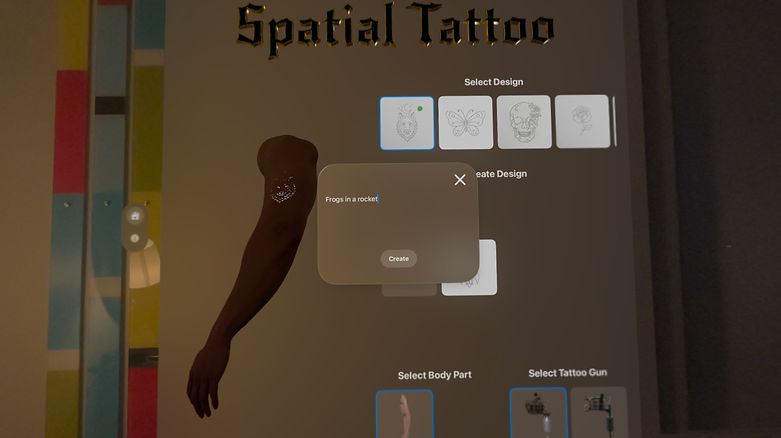
Prompt-to-Stencil: Users can verbally describe a concept (e.g., "Neo-traditional tiger with peonies"), and the AI generates a perfect tattoo outline.
B. Logitech Muse Pen Integration
-
Spatial Tattoo is a flagship demonstration of the Logitech Muse Pen’s capabilities.
-
Tactile Feedback: The pen simulates the vibration and resistance of a real tattoo machine gun.
-
Pressure Sensitivity: Just like a real needle, the line weight and ink depth respond to how hard the user presses against the virtual skin.

C. Immersive Simulation & Hand Tracking
-
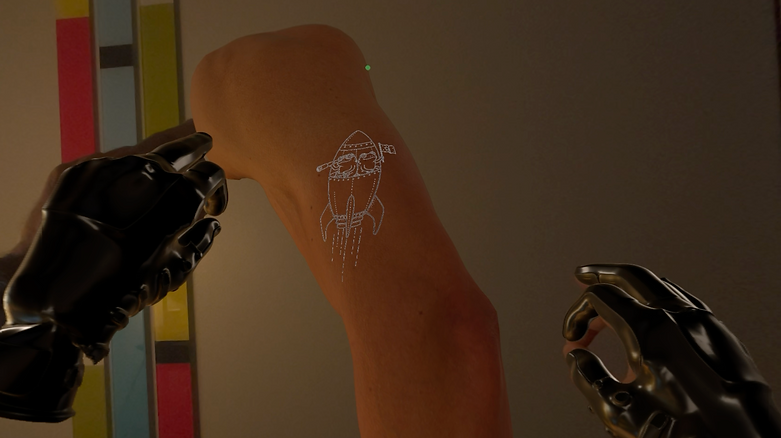
Virtual Gloves: Leveraging Vision Pro’s advanced hand tracking, the app renders realistic latex gloves over the user’s real hands, enhancing the feeling of being in a sterile, professional environment.
-
3D Anatomical Models: Users can rotate and zoom into high-fidelity 3D body parts (arms, legs, torsos) to practice difficult angles and skin stretching techniques.
D. Professional Customization Menu
A floating spatial menu provides granular control over the equipment:
-
Machine Gun Selector: Users can toggle between different machine types (e.g., Coil vs. Rotary), each offering different distinct sound profiles and handling characteristics.
-
Needle Configuration: Options to switch needle groupings (Liners, Shaders, Magnums) for different artistic effects.
-
Ink Palette: A dynamic color mixing station where users can dip their virtual needle to pick up or blend colors.

-
5. Conclusion
-
By combining the visual fidelity of the Apple Vision Pro with the haptic precision of the Logitech Muse Pen, Spatial Tattoo defines a new category of "Spatial Creativity." It moves beyond passive consumption, turning the headset into an active tool for professional development and artistic expression.

